
Let me save you six months: the reason your AI writing sounds like AI is not the AI. It’s your prompts. After writing dozens of articles with these tools, I’ve found a boring, repeatable structure that works every time – and ten ready-to-paste prompts you can steal today.
Why most prompts fail
Typing “write an article about productivity” is like handing a chef a shopping bag and saying “make dinner.” No context, no constraints, no idea who’s eating. The fix isn’t a magic phrase – it’s giving the AI a job with boundaries.
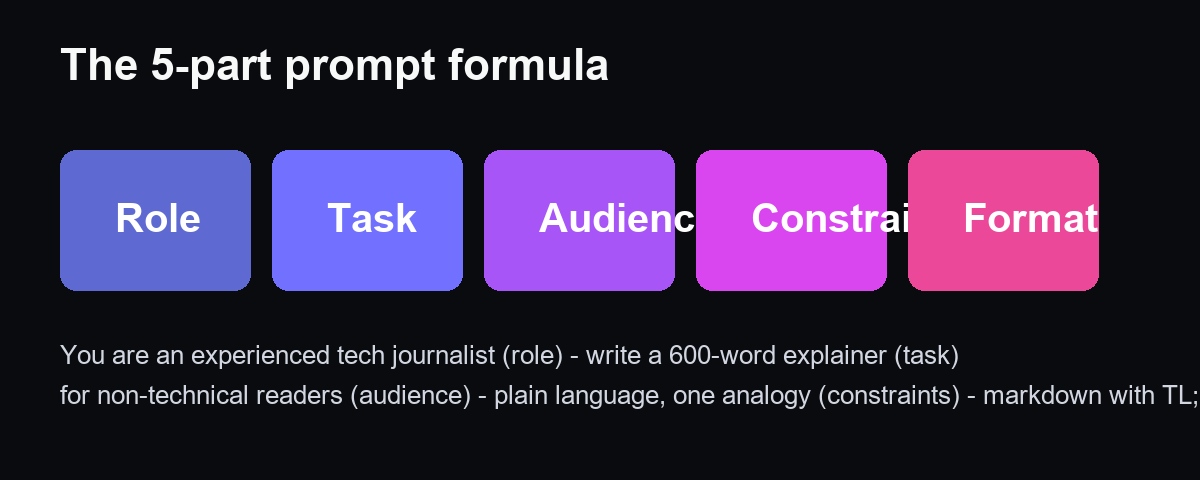
The formula
Role + Task + Audience + Constraints + Format. Example: “You are an experienced tech journalist (role). Write a 600-word explainer about RAG (task) for non-technical readers (audience). Plain language, one analogy, no jargon (constraints). Markdown with a TL;DR at the top (format).” That single sentence produces better output than most people’s entire prompt history.
Ten prompts I actually use
- Outline: “Give me a 5-section outline for an article about [topic], with a working headline for each section.”
- First draft: “Write the first draft of section 2 from this outline, 300 words, in the tone of this sample: [paste your writing].”
- Rewrite: “Rewrite this paragraph to be more concise and punchy. Keep the facts: [text].”
- Headlines: “Give me 10 headline options for this article – mix curiosity and clarity, no clickbait.”
- Summary: “Summarize this article in 3 bullets and a one-sentence takeaway.”
- FAQ: “Generate 5 FAQ questions and answers people might search for about [topic].”
- Email: “Write a short, friendly follow-up email to a client who hasn’t replied in a week.”
- Product description: “Write a 150-word product description for [product], benefits not features.”
- Comparison: “Build a comparison table of [A] vs [B] across price, features and ease of use.”
- Edit: “Check this text for grammar, redundancy and tone. Show me what you changed and why.”
The workflow that tripled my output
Write the outline yourself – ten minutes, and it keeps your voice and angle. Generate section by section, then edit everything yourself. The AI is a first-draft machine, not a publisher. This is the whole trick: the thinking stays yours, the typing gets faster.
Where to run these
Any free chat works – ChatGPT, Claude, or DeepSeek. Start with the free tiers; you’ll be surprised how little you need to pay.
Disclosure: some links are affiliate links. We may earn a commission at no cost to you.